
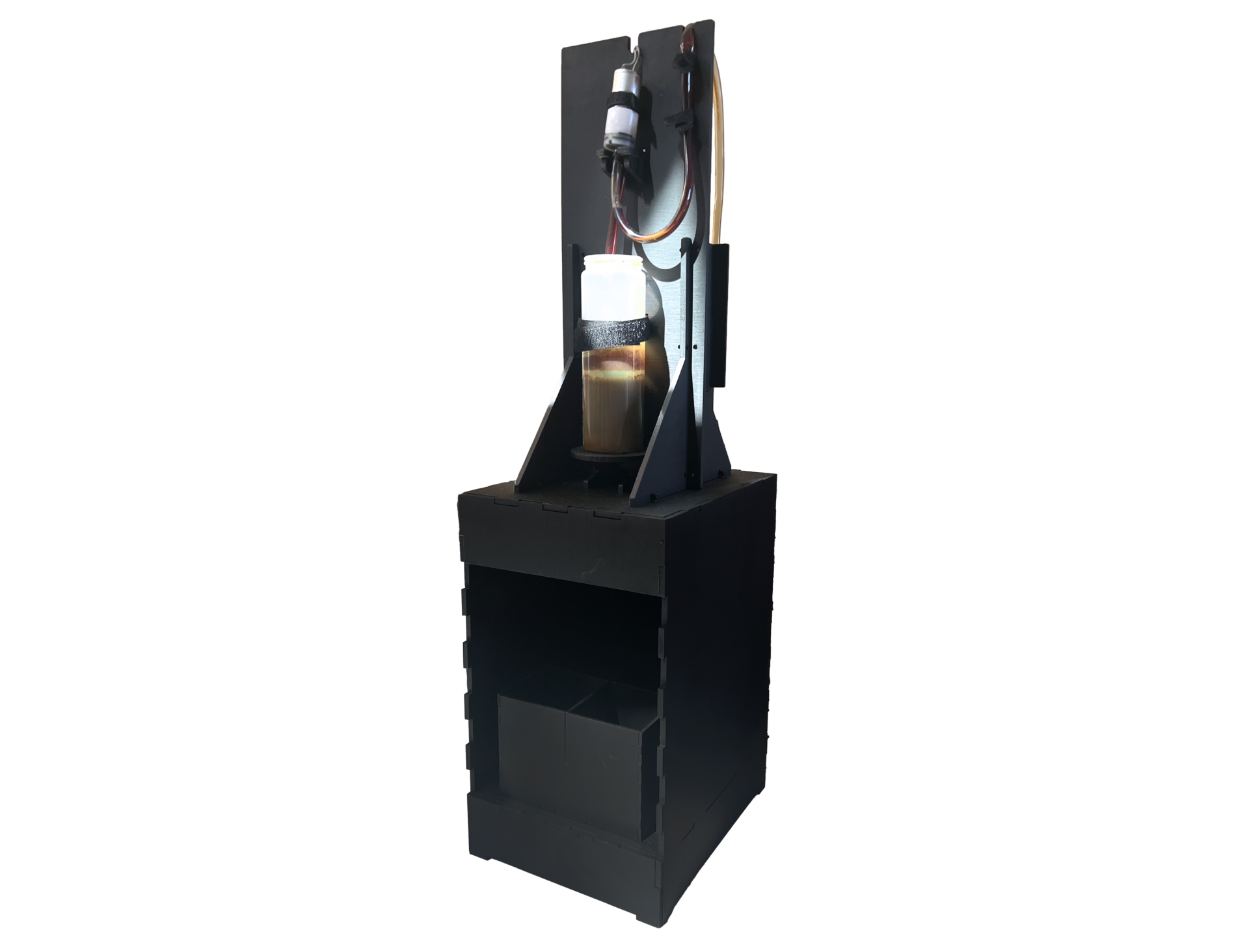
Stand-alone water pump system and three servo motor outputs.
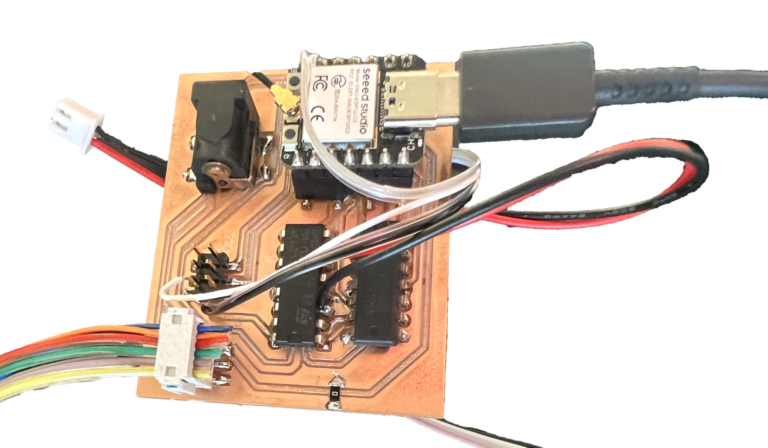
Electronics
The system uses a custom PCB (printed circuit board) to control the pump system and the motors. Clockwise starting from the top left, it includes a 12V power jack, ESP32C3 microcontroller, 3.3V to 5V logic level shifter, L293D motor driver (with black/red wires going to the pump), and two sets of connectors going to the servo motors on the tool holder and to two extra analog inputs. In this version of the PCB, one of the servo motors is wired directly to the board (grey/lilac/black wires).
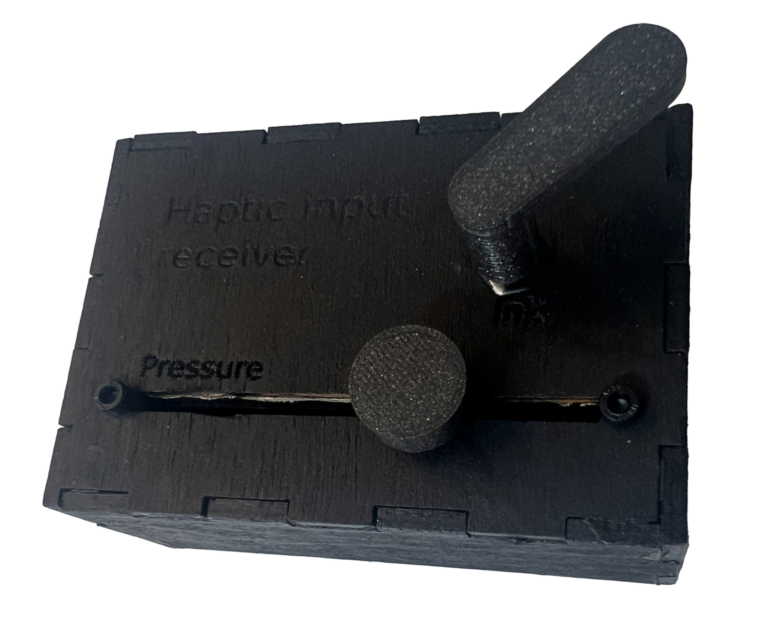
As part of the development of a stand-alone system, we also made a small box to control ink flow more precisely (with the lever) and pressure (with the slide knob) in case no external sensors are attached.
Code: interactive output receiver
#include <esp_now.h>
#include <WiFi.h>
#include <ESP32Servo.h>

// Up and down servo control
const int servoPin = 2;  // Define the pin connected to the servo

// Sweeping servo control
const int servoPin2 = 3;  // Define the pin connected to the servo

// Revolving servo control
const int servoPin3 = 4;  // Define the pin connected to the servo

const int waterpumpPin = 5;  // Define the pin connected to the water pump

Servo pressureServo;    // Create a servo object
Servo sweepServo;       // Create a servo object
Servo revolutionServo;  // Create a servo object
int angle;              // Variable to store the servo angle

int sensorData1;
int sensorData2;
int touchAngle;
int sweep;
int ink;

// Structure example to receive data
// Must match the sender structure
typedef struct struct_message {
  int id;  // must be unique for each sender board
  int revolution;
  int pressure;
  int sweep;
  int ink;
} struct_message;

// Create a struct_message called myData
struct_message myData;
struct_message boardsStruct[3];

// callback function that will be executed when data is received
void OnDataRecv(const esp_now_recv_info_t *recvInfo, const uint8_t *incomingData, int len) {
  memcpy(&myData, incomingData, sizeof(myData));
  // Serial.println(myData.revolution);


  // Update the structures with the new incoming data
  if (myData.id >= 1 && myData.id <= 3) {
    boardsStruct[myData.id - 1] = myData;

    // Serial.printf("revolution value: %s \n", boardsStruct[myData.id - 1].revolution);
    // Serial.printf("pressure value: %d \n", boardsStruct[myData.id - 1].pressure);
    // Serial.printf("sweep value: %d \n", boardsStruct[myData.id - 1].sweep);
    // Serial.println();
  }
  touchAngle = myData.revolution;
  // Serial.println(myData.revolution);
  sensorData1 = myData.pressure;
  // Serial.println(myData.pressure);
  sensorData2 = myData.sweep;
  // Serial.println(myData.sweep);
  ink = myData.ink;

  if (myData.id == 1) {
    board1action();
  } else if (myData.id == 2) {
    board2action();
  }
}

void setup() {
  // Allow allocation of all timers
  ESP32PWM::allocateTimer(0);
  ESP32PWM::allocateTimer(1);
  ESP32PWM::allocateTimer(2);
  ESP32PWM::allocateTimer(3);
  pressureServo.setPeriodHertz(50);    // standard 50 hz servo
  sweepServo.setPeriodHertz(50);       // standard 50 hz servo
  revolutionServo.setPeriodHertz(50);  // standard 50 hz servo
  pinMode(servoPin, OUTPUT);           // Set servo pin as output
  pinMode(servoPin2, OUTPUT);          // Set servo pin as output
  pinMode(servoPin3, OUTPUT);          // Set servo pin as output
  pinMode(waterpumpPin, OUTPUT);       // Set servo pin as output

  pressureServo.attach(servoPin);     // Attach the servo to its pin
  sweepServo.attach(servoPin2);       // Attach the servo to its pin
  revolutionServo.attach(servoPin3);  // Attach the servo to its pin
  Serial.begin(115200);

  // Set device as a Wi-Fi Station
  WiFi.mode(WIFI_STA);

  // Init ESP-NOW
  if (esp_now_init() != ESP_OK) {
    Serial.println("Error initializing ESP-NOW");
    return;
  }

  // Once ESPNow is successfully Init, we will register for recv CB to
  // get recv packer info
  esp_now_register_recv_cb(esp_now_recv_cb_t(OnDataRecv));
}

void loop() {
  board1action();
  // Serial.println("test");
  // // Set the angle of the servo
  // Serial.println(" set to 10 ");
  // pressureServo.write(10);  // Set the servo angle
  // delay(2000);
  // Serial.println(" set to 100 ");
  // pressureServo.write(100);  // Set the servo angle
  // delay(2000);

  // Move the servo from 0 to 180 degrees
  // for (int pos = 0; pos <= 180; pos += 1) {
  //   pressureServo.write(pos);  // Move the servo to 'pos'
  //   delay(15);           // Wait for 15ms for smooth movement (adjust if necessary)
  // }

  // // Move the servo from 180 back to 0 degrees
  // for (int pos = 180; pos >= 0; pos -= 1) {
  //   pressureServo.write(pos);  // Move the servo to 'pos'
  //   delay(15);           // Wait for 15ms for smooth movement (adjust if necessary)
  // }
}

void board1action() {
  // Squeeze to pressure
  if (sensorData1 < 3200) {
    int angle = map(sensorData1, 3200, 1000, 0, 180);  // 90-180 should be clockwise
    pressureServo.write(angle);                        // Set the servo angle
  }
  if (sensorData1 > 3200) {
    pressureServo.write(93);  // Set the servo angle, this should stop it
  }
  Serial.println(touchAngle);
  Serial.print("Stretch to pressure: ");
  Serial.println(sensorData1);
  Serial.print("Sound to sweep: ");
  Serial.println(sensorData2);
  Serial.println(" ");
  // Sound to sweep
  // if (sensorData2 > 200) {
  //   // Calculate sweep offset and speed
  //   // int offset = map(sensorData2, 1000, 4095, 0, 90);    // Sweep offset from 0 to ±90
  //   int sweepSpeed = map(sensorData2, 200, 4095, 100, 20);  // Faster sweep with higher sensorData2
  //   int offset = 30;
  //   // Sweep to 90 + offset
  //   sweepServo.write(90 + offset);
  //   delay(sweepSpeed);

  //   // Sweep to 90 - offset
  //   sweepServo.write(90 - offset);
  //   delay(sweepSpeed);
  // } else {
  //   sweepServo.write(90);  // Return to center if sensorData2 is low
  // }
  sweep = map(sensorData2, 0, 4095, 0, 180);  // Faster sweep with higher sensorData2

  Serial.println(sweep);
  sweepServo.write(sweep);  // Return to center if sensorData2 is low

  // Touch to revolution
  revolutionServo.write(touchAngle);  // Set the servo angle

  if (ink == 0) {
    digitalWrite(waterpumpPin, HIGH);
  } else {
    digitalWrite(waterpumpPin, LOW);
  }
  delay(50);
}

// Not yet in use
void board2action() {
}