In machine hacking, taking control of the communication between human and machine is not just a technical necessity—it’s a creative opportunity. Standard machine workflows often assume a fixed chain of operations, leaving little room for experimentation or adaptation. But when we hack machines, we go beyond pushing “start.” We intervene in the conversation between design and execution, customizing how and when machines move, pause, or respond. This level of control is fundamental—not only for pushing the boundaries of what machines can do, but also for enabling new ways of making that reflect our own logic, timing, and material sensitivity. In this article, we focus on developing communication protocols that go beyond default software, giving us the flexibility to embed pauses, change speeds, and choreograph movement in ways that support more nuanced, responsive fabrication.
Spiral Development: Rethinking Machine Workflows
To rethink machine communication and design preparation, we adopted a spiral development approach—an iterative process that allowed us to test, reflect, and refine as we moved between software environments, material behaviors, and machine capabilities.
We began by testing the machines using their standard workflows:
-
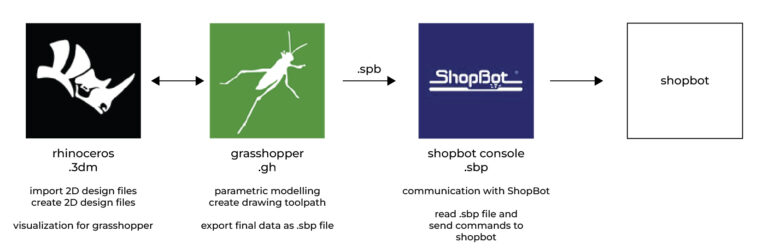
ShopBot: Designing and preparing vector files → creating toolpaths in VCarvePro → sending toolpaths to the CNC machine via ShopBot Console.
-
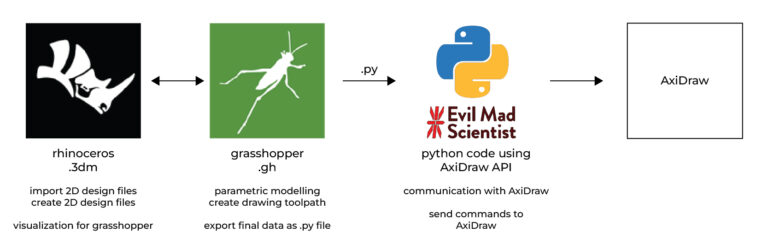
AxiDraw: Designing and preparing vector files → sending the drawing toolpaths to AxiDraw via the Bantam Tools NextDraw extension in Inkscape.
These default workflows are straightforward and functional, but they also assume a conventional, linear understanding of fabrication. As we engaged with the machines and the materials more closely, it became clear that this wasn’t enough. The machines could move, but we wanted them to respond.
Rewriting the Rules of Machine Communication
Reflecting on the capabilities and constraints of the standard software, we identified a set of additional communication needs specific to our use cases—particularly when working with tools designed for drawing, dyeing, and printing:
-
Timed and preprogrammed pauses either above or on the surface of the material—to mimic techniques such as dot work, block printing, or to allow interaction with different tools (e.g., revolving or swinging attachments).
-
Moving to a predefined location when needed—for example, to dip tools into a dye medium between strokes.
-
Controlling the drawing order, to sequence operations in a specific logic or narrative.
-
Testing and modifying pen heights and speeds on the fly (applies for AxiDraw).
-
Reliable pause and resume functionality, to overcome the limitations of AxiDraw’s default pause behavior.
To implement these needs, we had to step outside of the software’s default boundaries and start writing our own communication protocols.
ShopBot: Reclaiming CNC Control
Our work on customizing ShopBot communication began during the Open Source Hardware Week at Fabricademy 2023. Here, we explored how altering the ShopBot’s code structure gave us finer control over the fabrication process.
By creating custom ShopBot codes, we gained the ability to embed actions not possible through the default toolpath generation in VCarvePro. This included inserting pauses at specific intervals, and incorporating conditional movements. Through this, the ShopBot transformed from a rigid subtractive tool into a responsive fabrication partner—capable of accommodating time-based or interaction-based making strategies.
AxiDraw: A Drawing Tool, Reimagined
The AxiDraw posed different challenges. As a precision plotter, its standard setup—using Inkscape with extensions like NextDraw—focuses on simplicity and automation. But this simplicity becomes a constraint when the goal is to experiment with non-linear drawing, tool interactions, or custom tool holders.
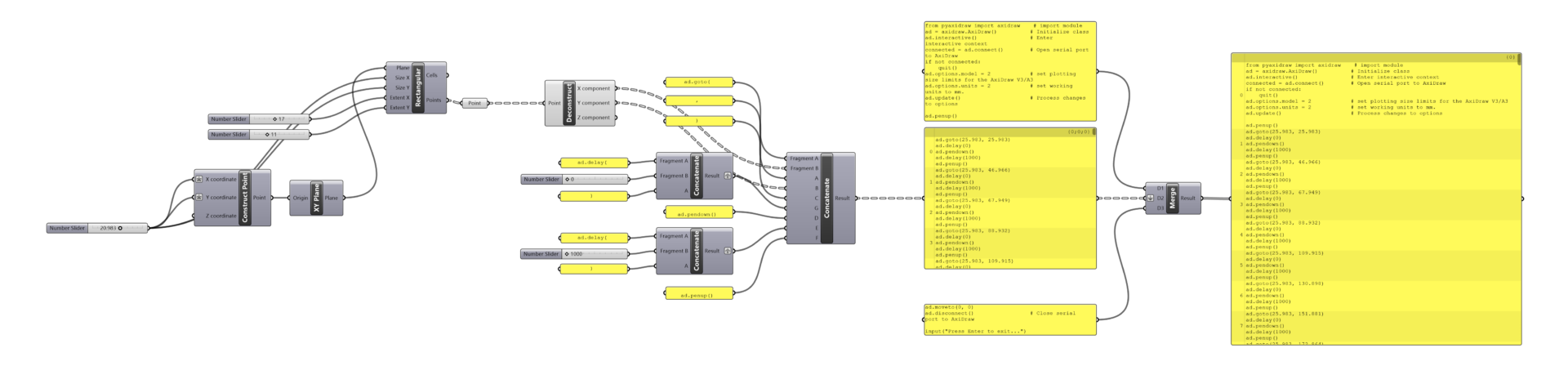
To achieve more control, we developed our own communication protocol, allowing us to choreograph the AxiDraw’s movement more intricately. For instance, we could specify when to lift or lower the pen, dwell above a surface, or navigate to off-drawing locations for dipping or cleaning the tool. Fine-tuning pen pressure and drawing speed also became part of this expanded control layer.
Machine Control Protocol
In this project, our machine control protocol consisted of two intertwined components:
-
Machine Communication Code – responsible for sending and managing movement commands to the machine, dictating the sequence and logic of operation.
-
Microcontroller Code – used to independently control parts of the tool holder, such as actuated arms or rotating elements, that operate in coordination with the machine’s path.
This article focuses on the first: the communication layer that establishes how the machine listens, responds, and acts. If you’re interested in the microcontroller component, which handles the auxiliary tool functions, you can read more in this article.